
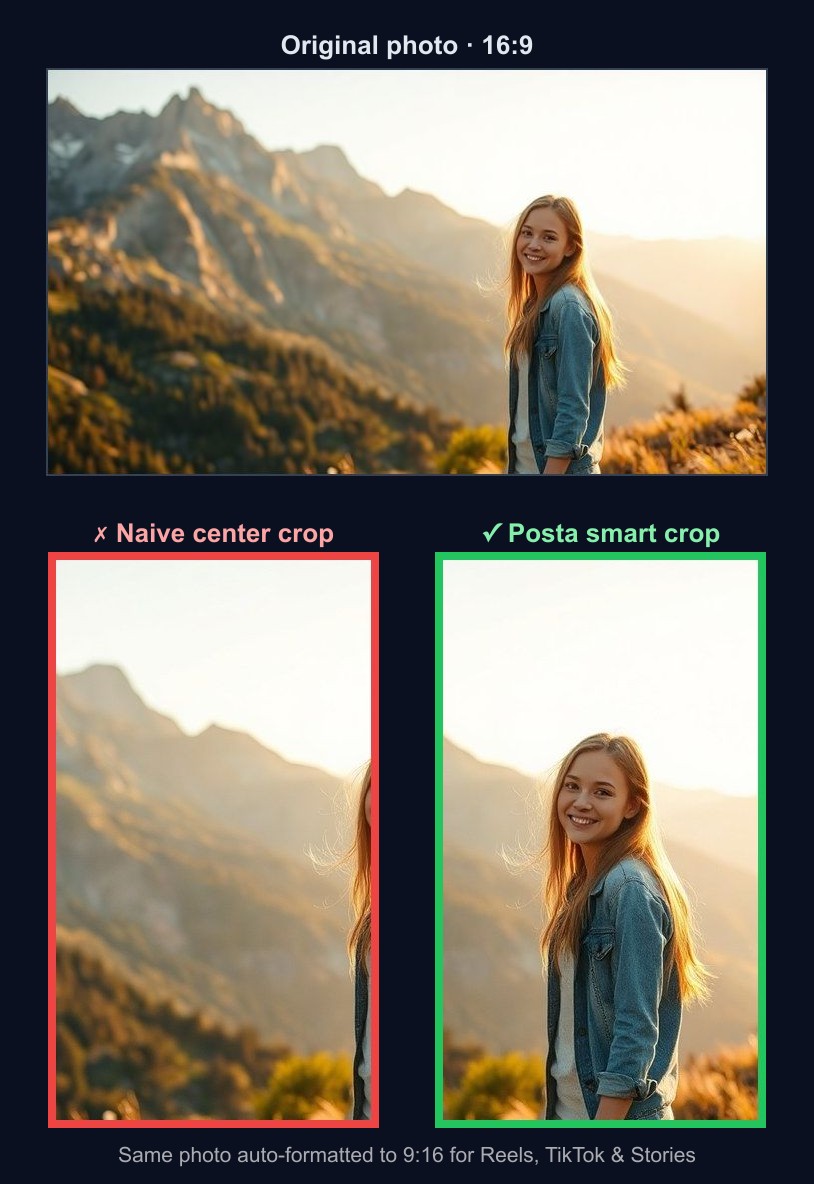
Every network wants a different shape: TikTok and Reels are 9:16, the Instagram feed is 1:1 or 4:5, YouTube is 16:9. Resize one photo to all of them and a naive center crop will happily slice your subject in half. Posta avoids that by detecting the faces in your media and cropping around them — automatically, on every upload. Here’s the same photo cropped to 9:16 two ways:
Step 1 — Find the faces
When you upload an image, Posta runs it through Google Cloud Vision face detection. For each face it doesn’t just take the raw bounding box — it expands the box using key facial landmarks (chin, jaw, lips, forehead, ears) and adds ~10% padding below the chin, so the whole head is captured rather than a tight rectangle that clips foreheads and chins.
From all detected faces it computes two things: the center of mass (the average center of every face) and the primary face (the largest one). Those drive the crop.
Step 2 — Crop around them
For each platform’s target ratio, Posta works out the largest crop of that shape that fits the original, then positions it: instead of the geometric center, it centers the crop on the faces’ center of mass. It then nudges the window so that every face stays inside the frame (with a 10% safe margin) and clamps it to the image edges. One photo, the right framing for each shape:
- 9:16 — TikTok, Reels, Shorts, Stories
- 1:1 — Instagram, Facebook, Threads, LinkedIn square
- 4:5 — Instagram & LinkedIn portrait
- 16:9 / 1.91:1 — YouTube, X, LinkedIn landscape
No faces? It doesn’t crop at all
Cropping only makes sense when there’s a subject to keep. If Vision finds no faces, Posta switches to resize-to-fit instead of cropping — so screenshots, product shots, charts, and text graphics keep all their content (nothing important gets sliced off the edges). Pinterest is always treated this way too, since it favors tall, full-image pins over a fixed ratio.
It happens automatically
You never configure any of this. Upload once — through the dashboard, the API, an AI agent, or an n8n workflow — and Posta generates every platform variant with the right framing. The same face-aware logic runs for video, so your Reels and Shorts keep people centered too.
Stop reframing the same photo eight times. Start a 14-day free trial — no credit card required — and let Posta handle the crops.